Enter your IMEI or SN
This article provides a comprehensive guide on how to locate the IMEI/SN codes for DOOGEE mobile phones and tablets. It includes emergency solutions for situations where the device is malfunctioning, as well as detailed instructions on the specific navigation paths for both mobile phones and tablets.
1. Users are unfamiliar with the specific locations for finding serial codes on different devices.
2. When requesting repair services, users are unable to retrieve the IMEI/SN code due to device malfunctions (e.g., a black screen or failure to power on).
1. Hardware failures prevent the system information from being displayed.
2. The storage locations for serial codes vary across different types of devices.
3. New users may not have retained the original product packaging.
1. If the device powers on and boots into the system normally:
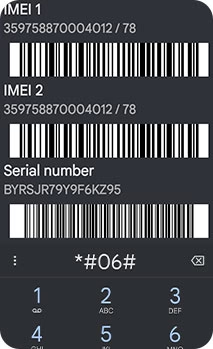
(1) Enter "*#06#" into the phone's dialer; a device information window containing the IMEI and SN details will automatically pop up.
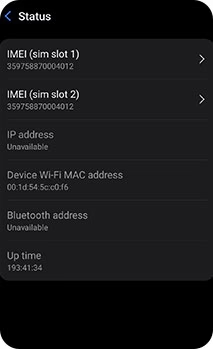
(2) On the mobile phone/tablet, navigate to "Settings > About Phone (or About Tablet) > Status > IMEI" to view the information.
(3) On the mobile phone/tablet, navigate to "Settings > About Phone (or About Tablet) > Status > Model > Serial Number" to view the information.
2. If the device fails to power on:
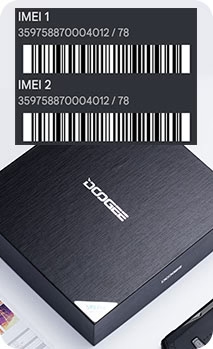
(1) The corresponding IMEI/SN information can be found on the product information label located on the back of the device's original factory packaging box.
(2) For certain device models, a silver label containing the corresponding IMEI/SN information is printed directly on the back of the device itself.